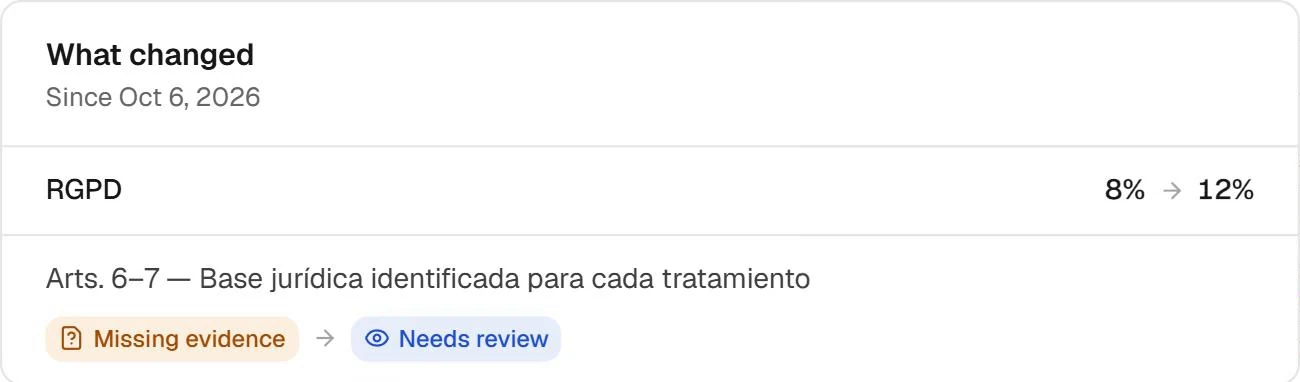
A policy approved last month says little about a configuration changed today. Connect source changes to the systems, cases and evidence your team already reviews.
A connected source changes after your review. The comparison gives your team context to decide what to check without starting its investigation again.
Source MonitorPRODUCT WALKTHROUGH
Source Monitorsupport-apiIllustrative demo
GITHUB / DEPENDENCIES
AI SDK · support-api
Monitored
Source activitysupport-api
Reference retainedpackage.json · main
01
Dependency identified@anthropic-ai/sdk
02
Ready to compare0.60.0 → 0.61.0
03
Source
GitHub
Object
AI dependency
Reference
Previous version retained
Demonstration dataNo changes to your systems
FROM SIGNAL TO ACTION 01 / 03
The source. The context. A starting point.
Fictional data. Workflow illustration, not a connected session or a dashboard screenshot.
CONNECTED TO YOUR TEAM’S WORK
GitHubConnected sourcesComparisons
WHAT YOU DO WITH FENCIA
From the first signal to an answer you can explain.
Explore the screens and the work behind each result.
01
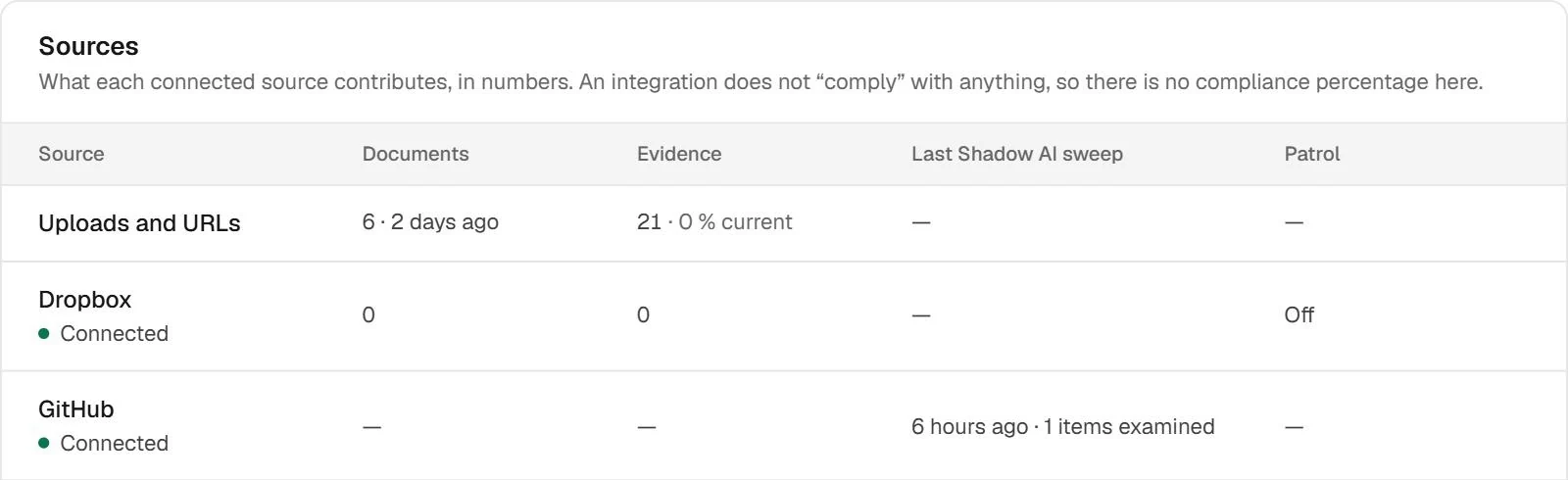
Where it came from is part of the answer.
An isolated signal makes your team investigate again. The sources view brings together provenance and what each connection contributed, helping distinguish a source without findings from one that needs attention.
Source monitoring compares supported references to give context to a new review. Workspace change views help your team return to outstanding work. A technical change is a signal to investigate, not a risk conclusion.
Governance status changes view; complements the source comparison in the demo.
03
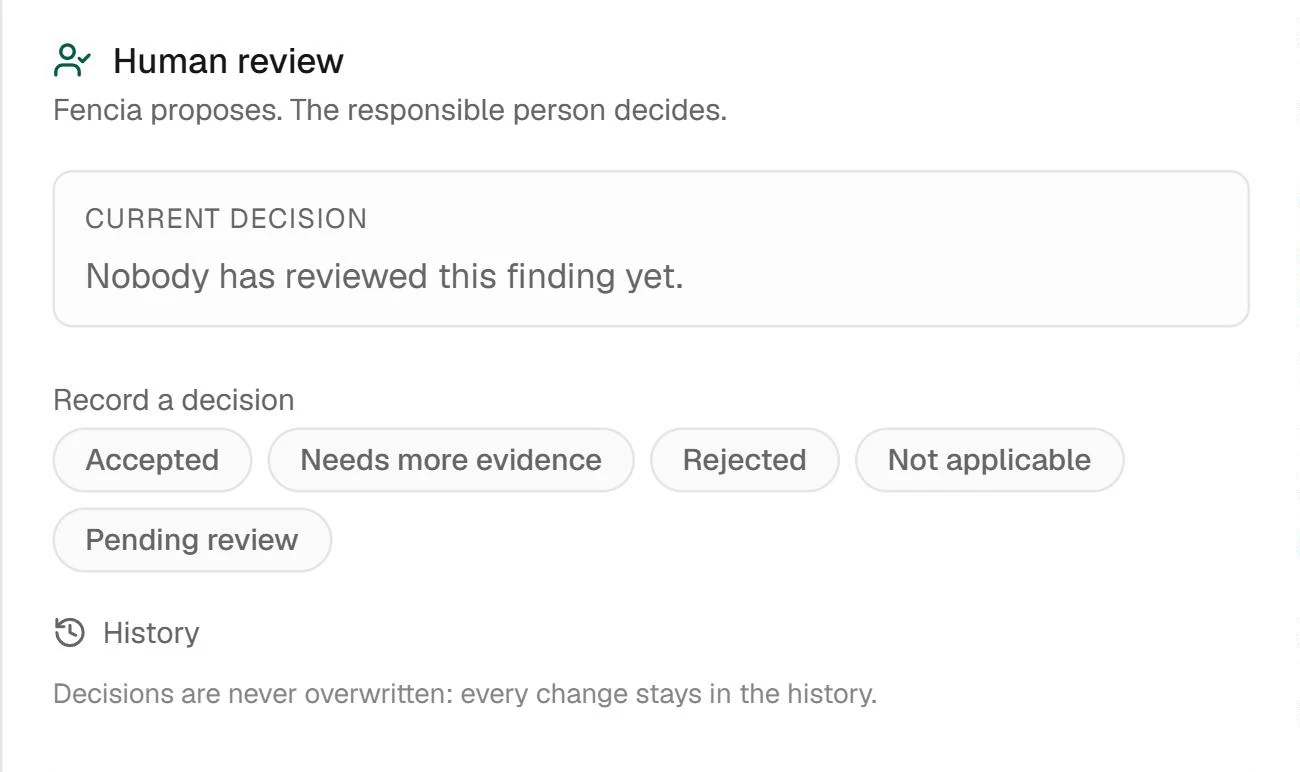
A finding leads to a human decision.
Open the detail, check the source and decide what it means for your organisation. Review separates the agent’s proposal from a decision confirmed by your team; both need context.
Example document finding review; illustrates the shared review workflow.
Real Fencia captures from a test workspace. Fictional data; shared views complement each feature’s specific demo.
BEFORE YOU START
Answers for your team.
Does it replace document patrol?
They are different workflows. Monitoring follows changes in supported sources. Patrol reanalyses documents in supported folders on the available schedule.
Does every change need a full reassessment?
Not necessarily. Your team reviews the change and decides whether it affects the system’s use, configuration or evidence.
IN YOUR TEAM’S WORKFLOW
A one-off assessment goes out of date.
Active monitoring brings changes back into the governance workflow, so your team can see what happened and what needs another look.
01
Establish the starting point
Connect a supported source and review the resources or configuration it exposes.
02
Follow meaningful changes
GitHub webhooks surface repository events. Cloud sources are reconciled periodically; document review follows its configured schedule.
03
Return to the case
Inspect the change and its context, then review a correction and the available verification evidence.
A clear scope before connecting.
Frequency varies by source. Cloud reconciliation and scheduled document review are not instant. A provider outage or missing permission can limit visibility.
Is every source monitored in real time?
No. GitHub events and agent hooks can report when they occur. Other sources use periodic checks. Each connection shows its scope and status.
Start with one source and a real question.
Review how this workflow fits your team’s work with us.

 Enlarge